

Key Takeaways
-
Purchase orders formalize buying: A PO is a legally binding document that outlines items, quantities, pricing, and terms before goods are supplied.
-
Improves cost and inventory control: POs help businesses track spend, prevent duplicate orders, manage stock levels, and maintain clear audit trails.
-
Different PO types serve different needs: Single-use POs cover one-off purchases, blanket POs support recurring orders, and planned POs prepare for future demand.
-
Clear process reduces errors: The PO workflow typically includes requisition, approval, PO issuance, supplier confirmation, delivery, and invoice matching.
-
Automation increases efficiency: Digital PO systems reduce manual errors, speed up approvals, and connect purchasing with inventory and accounting.
According to the U.S. Small Business Administration Office of Advocacy, there were 30.7 million small businesses in the United States as of 2016. This makes up 99.9% of all businesses. While the term “purchase order” may be associated with procurement from larger companies, it is also vital for the day-to-day operations of our economy’s largest contributor.
The entire process of accounts payable can seem like an administrative headache. You trust your vendors to give you correct orders at your agreed price, right? However, there are many benefits of adopting purchase orders into your procurement process. You can do this manually, but it may also be done with accounting software.
This guide will go over the purchase order process so that your business can keep track of your expenses and ensure accuracy in your accounts. By establishing a purchase order system, your company will be on the road to better money management and a more efficient accounting department.
What is a Purchase Order?
A purchase order is, essentially, a binding contract between a customer and a vendor that agrees on the quantity and pricing of a product or service. It is a legal document drafted by a customer to be accepted or rejected by the vendor. This legal document should be a vital part of your purchasing system.
Purchase orders are an essential step in the procurement or purchasing process. A small business can send out requests for quotations from one or more vendors. They can then create a purchase order from that quote. For some businesses, it will be a way to negotiate a contract or price.
If you are employing a specific discount strategy, using quotes and purchase orders can be a good way to cut costs. This way, you will be able to gain sales from different promotions while still making a profit.
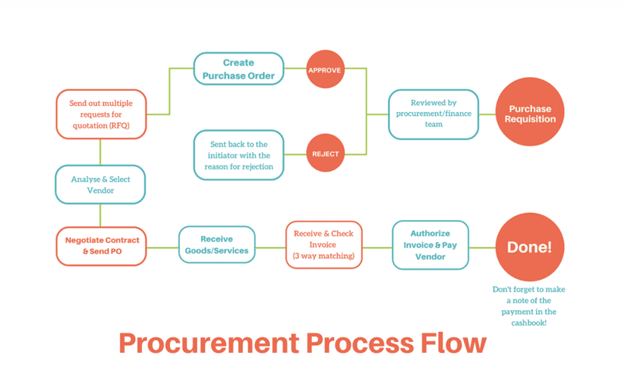
https://kissflow.com/procurement-process/#:~:text=What%20is%20a%20Procurement%20Process,purchase%20order%20and%20invoice%20approval.&text=Regardless%20of%20the%20uniqueness%2C%20every,Process%2C%20People%2C%20an
A purchase order represents your intent to buy products or services. You, as the customer, are responsible for creating this document. Communicating with the vendor may also be useful when drafting your purchase order. This is especially true if you are not creating the document from a quote. Consider an enterprise communication solution to keep in contact with your vendors and customers alike.
Purchase Order vs. Invoice: Key Differences
If you have never used purchase orders before, it may be difficult to discern the difference between these legal documents and invoices. So, what IS the difference between an invoice and a purchase order?
A purchase order is, in practice, a reverse invoice. A customer is responsible for drafting and sending the purchase order and the vendor is responsible for sending the invoice.
The two often work in tandem. The purchase order number or PO number matches the resulting invoice number sent by the vendor. In a procurement process, the PO comes before the invoice. The invoice is a receipt that the vendor has met its obligation set out during the PO process.
Why Use Purchase Orders?
The PO process allows businesses to track inventory and cost while ensuring accuracy. It can also be an important aspect of project management. Purchase orders allow you to track what vendors are providing which products or services to ensure that your project workflow is running smoothly. It also allows purchasing departments to confidently fill out order forms for goods and services.
Purchase orders also make procurement legal and accountable. By creating a paper trail, you are protecting yourself in the event of an audit. Having an audit trail is vital to protecting your business. Keeping these records also allows your business to do your own auditing of your finances.
The matching of invoices and purchase orders gives your purchasing departments and accounts payable team members confidence during the procurement process, and when paying invoices. Supplying a purchase order also shows efficient financial management. It allows your business to track payments and incoming orders, reduce the possibility of duplicate orders, and can assist in budgeting.
Having a purchase order also gives you more control over your retail KPIs, giving you the perfect order rate. You have a contract of when an order is expected to come in. This lets you know exactly when you will be able to then provide or ship that inventory to customers.
Types of Purchase Orders
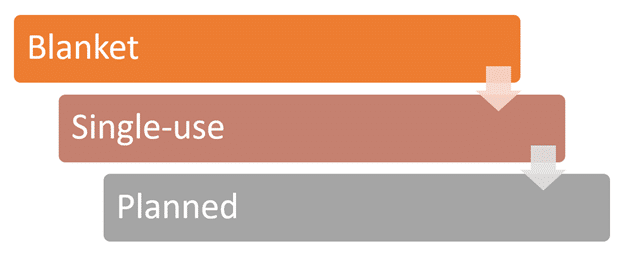
While the basic principle of purchase orders is the same in any situation, there are several different types. They include:
Blanket purchase order
This is used when procurements from a vendor are needed over an extended timeframe. If a vendor is sourcing a product or service over time, it may be helpful to secure a specific price. This type of purchase order requires a customer to commit to a product or service with set terms. It allows for reorders without requiring an additional PO.
Single-use purchase order
Single-use POs are used when ordering something that you may not need again. It can also be used if you always require products and services in different types or quantities.
Planned purchase order
Planned purchase orders are similar to single-use, but instead of being immediate, they roughly predict future needs. If your company needs a product or service and you wish to sort it out now, a planned purchase order may be suitable.
For example, if you are designing a website and need to do the “Development” step in your Magento checklist, it may be useful to find the developer before your need. It ensures, when you reach that step, the rollout of your website isn’t stalled. You will have your PO ready whenever you are.
What is the purchase order process?
The basic process of a purchase order includes the following steps:
1. Creating a purchase requisition
If you have a small business made up of different departments, your order request may need to be passed by your accounting team or by management before the PO is made. This requires the team member making the order to make a purchase request.
The approval process reduces the risks of mistakes or redundancies when orders are made. It also ensures the products or services requested are within the available budget.
2. Issuing the purchase order
This would generally be done by email or via the vendor’s website. However, for vendors you regularly deal with, it may be useful to find more informal communication channels with your reps. Consider messaging platforms for communicating with vendor representatives. Slack alternatives, like Glip, Chanty, and Google Chat, are great services for quick, reliable communication.
3. Approval, rejection, or negotiation by the vendor
The approval, rejection, or negotiation is initiated by the vendor after they receive your PO. Hopefully, this step is quick because the terms should have been relatively agreed upon before. However, if negotiations are needed or if your PO is rejected, you may have to repeat steps 1 and 2.
4. Record the PO
Make sure the PO is recorded after it has been accepted. After the products or services come in or are performed, and an invoice is delivered, then the accounting department can match the invoice to the PO.
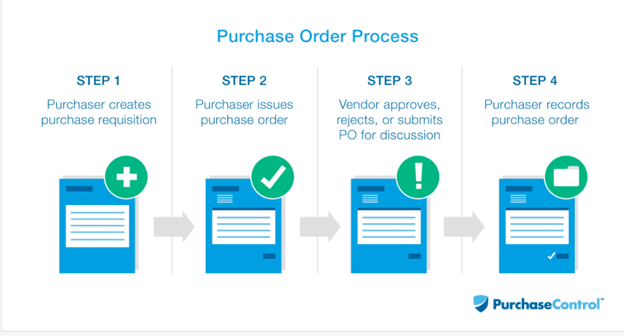
https://www.purchasecontrol.com/blog/purchase-order-process/
Common Mistakes in the Purchase Order Process
Mistakes in the PO process can disrupt operations, delay fulfillment, increase costs, and weaken financial control. Here are the most common pitfalls:
1. Skipping the purchase requisition step
When the requisition step is skipped, there’s no formal review of what needs to be purchased. This often leads to unnecessary or duplicate orders, overspending, and weakened internal controls, making it harder to track approvals and monitor company expenses.
2. Incomplete or inaccurate vendor or item information
Errors in quantities, SKUs, or vendor addresses can cause fulfillment delays, incorrect deliveries, and additional administrative work, disrupting inventory management and slowing down the entire purchasing process.
3. No clear approval workflow
Without defined rules for who can approve purchases, the process slows down, decisions get delayed, and there’s a higher risk of unauthorized or incorrect orders, which can lead to overspending and weakened internal controls.
4. Not tracking or organizing PO numbers
Missing or duplicating PO numbers make it difficult to reconcile orders and invoices, reduce visibility into spending, and complicate audits, increasing the risk of errors and financial discrepancies.
5. Relying on manual processes
Using spreadsheets or email for POs increases errors, slows communication, and reduces accuracy, making it harder to track orders, monitor spending, and maintain efficient procurement workflows.
How to Automate Your Purchase Order Procedure
Running a small business comes with countless responsibilities, and managing purchase orders can feel time-consuming. Automating your PO process can save time, reduce errors, and give you more control over your operations.
Step 1. Choose e-procurement or purchasing software
Use digital tools to simplify the PO workflow. This makes creating, sending, and tracking orders faster and more accurate while integrating with your inventory management systems.
Step 2. Sync inventory and accounting for real-time accuracy
Ensure your accounting and inventory systems are connected. Automation allows real-time accounting, reduces duplicate orders, prevents fulfillment errors, and keeps your financials up to date.
Step 3. Put data protection systems in place
Secure your accounting and inventory data. Strong digital safeguards protect your business from unauthorized access and data breaches.
Step 4. Build a digital vendor directory
Maintain a central database of vendor contacts, payment terms, and invoicing processes. This helps your team quickly track previous orders and spot discrepancies.
Step 5. Streamline communication using an omnichannel call center
For businesses handling many vendor or customer calls, an omnichannel call center ensures calls reach the right team member. This improves efficiency and strengthens vendor and customer relationships.
Purchase order template
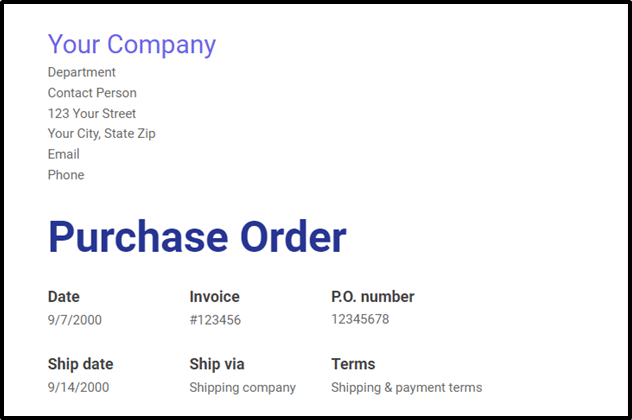
Now that you know the process, it is useful to know what you should include on a standard purchase order. If you use accounting software, it may already include templates for purchase orders. Typically, you can edit these templates to suit your needs. Your purchase orders should include:
PO number
The invoice number should correspond to the PO number or the vendor should include the PO number on their invoice. It may also be helpful to include the invoice number (if available) in your purchase order.
Your business’s (the purchaser’s) details
This should include the department, person of contact, address, and email.
Payment terms
Indicate if you intend to pay upon receipt of the invoice or if the vendor agreed to terms, like Net 30. If you run a retail business, like an omnichannel ecommerce brand, it may be useful to get extended terms. This allows you a chance to have a positive cash flow. You may also want to indicate if you intend to pay by credit card or check.
Shipping method
This is usually dictated by the vendor unless your business requires special accommodations.
Shipping date or expected delivery date
Make sure your vendor knows when you need the order by.
Vendor details
If you need to send the PO to a particular department, include this as well.
Shipping details
Where do you want the order to be sent?
Item number (if applicable)
This would typically only include products, however, some service vendors use item numbers.
Description
What do you expect the items to look like or what services do you need?
Quantity
How much of each item or service do you want?
Price per unit
This should be before taxes. Indicate the agreed-upon price.
Final costs
This includes:
- Total (before taxes)
- Total tax
- Total net
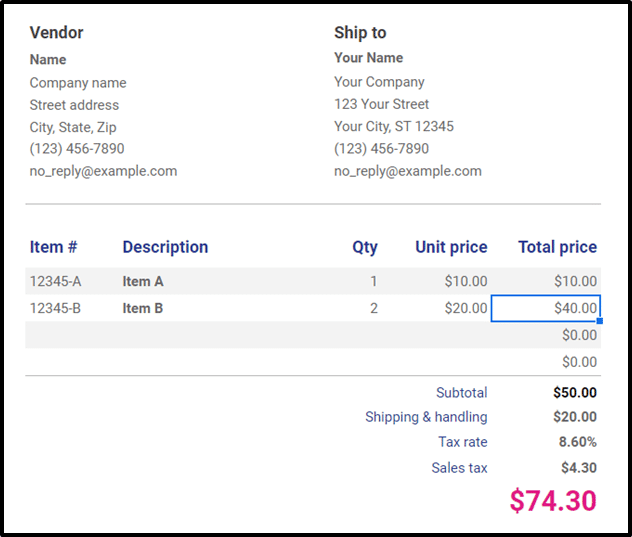
All this information should be available to you on the vendor website, quote, order form, or from communications with the vendor. Make sure your purchasing department has all the information they need to make an accurate PO. With information and a template, or with an automated system, you can send purchase orders and process invoices with efficiency and accuracy.
Purchase Order Process FAQs
What is the 3 way PO Process?
– The 3-way purchase order process matches the purchase order (PO), the supplier’s invoice, and the goods receipt. This ensures the ordered items, quantities, and prices align before payment is made, preventing errors or overpayment.
What are the 5 P’s of purchasing?
– The 5 P’s are Product, Price, Place, Promotion, and People. They guide procurement by ensuring the right product is sourced at the right cost, delivered to the right place, promoted effectively, and managed by the right personnel.
What are the 7 R’s in purchasing?
– The 7 R’s are Right quality, Right quantity, Right time, Right price, Right source, Right place, and Right service. They help businesses acquire goods efficiently and meet operational needs.
What is the PO matching process?
– PO matching verifies that the invoice from a supplier matches the purchase order and the goods received. This prevents discrepancies, confirms accuracy, and authorizes payment.


